How Agency Owners Should Brief a WordPress Developer
The six sections every WordPress developer brief needs. Template inside. Cut clarification cycles and reduce delivery time by 20-40%.
How Agency Owners Should Brief a WordPress Developer
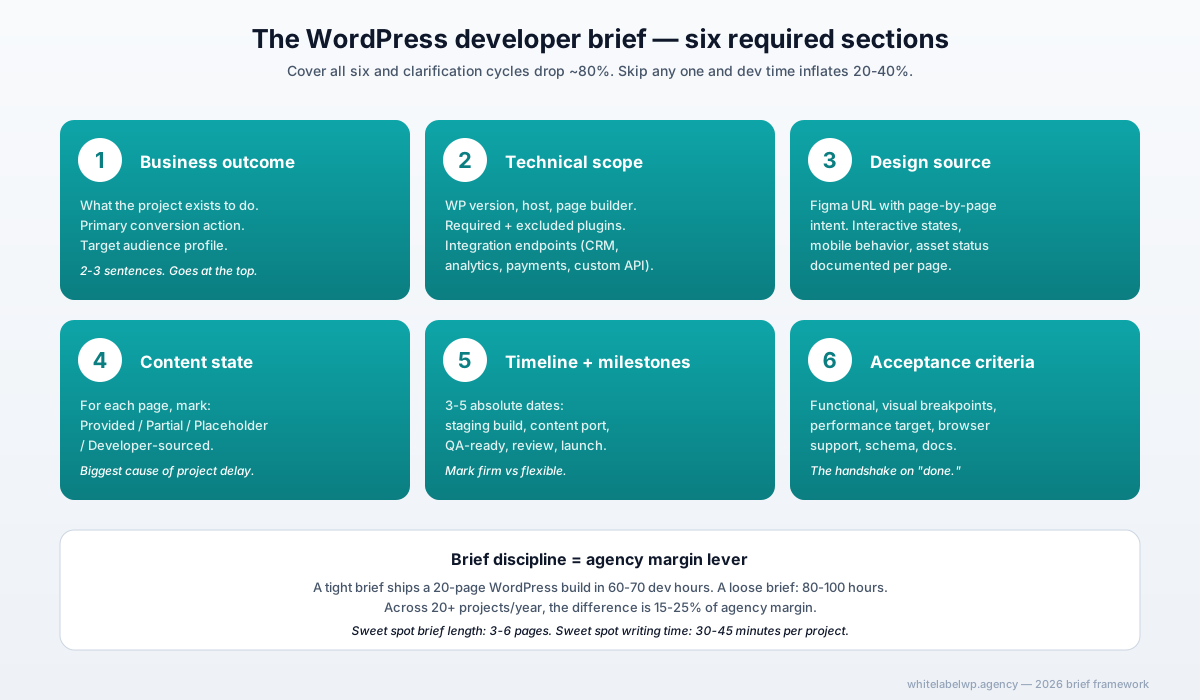
A WordPress developer brief that produces good work first time covers six things: the business outcome the project must deliver, the technical scope and constraints (stack, host, page builder), the design source (Figma URL plus page-by-page intent), the content state (provided, partial, or TBD), the timeline with non-negotiable dates, and the acceptance criteria for “done.” A brief missing any of those forces clarification cycles that cost 4-8 hours per project on the developer side and slow delivery by 20-40%.
The honest take: brief quality matters more than developer quality. A great developer with a bad brief ships worse work than a mediocre developer with a great brief.
Why brief quality matters more than developer quality
Two scenarios. Scenario one: agency briefs a developer with a one-paragraph Slack message and three Figma links. Dev quotes a number based on vague scope, starts building, and 12 hours in starts asking questions — “is this section a slideshow or a static grid?” “What forms plugin should I use?” “Does the contact form post to the agency’s CRM or the client’s?” Each question is one to three days of waiting, plus a context-switch cost for the dev. By delivery time, the dev has burned 22 hours instead of 14 and the agency is two weeks behind.
Scenario two: agency briefs the same developer with a six-page brief covering the six sections in this article. Dev quotes confidently, starts building, and runs into zero clarification cycles. Delivers in 14 hours. Agency is on time.
Same developer. Same project. Different outcome. The difference is brief discipline.
In practice, briefs are an agency margin lever more than they’re a project-management nicety. Tight briefs let the agency price tightly, the dev work efficiently, and the client get what they expected. Loose briefs absorb time and margin at every stage.
The six sections every WordPress brief must have
1. Business outcome
What’s the project actually for? Not “build a new website” — the business outcome behind it. Lead generation for a B2B SaaS, e-commerce launch for a DTC brand, content publishing platform for a media client, recruiting funnel for a staffing agency.
The business outcome belongs at the top of the brief because every later decision (forms? schema? performance? mobile-first?) routes back through it. If the developer knows the outcome, they make better decisions on the 100 small choices the brief didn’t anticipate. If they don’t, they default to generic, which usually means “looks fine, doesn’t drive the outcome.”
Two sentences is enough:
“Lead generation site for a B2B fintech. Primary conversion is a ‘Book a Demo’ form that posts to HubSpot. Secondary conversion is a gated PDF download. Target audience is finance directors at $50M-$500M companies.”
2. Technical scope and constraints
The non-negotiable technical decisions:
- WordPress version. Latest stable, unless legacy plugin requires a specific older version.
- Host. Where does the site live? WP Engine, Kinsta, Cloudways, Pressable, RunCloud, custom VPS. Names, not “managed WordPress hosting.”
- Theme or page builder. Bricks, Elementor, Divi, Gutenberg blocks, custom theme. Pick one. Don’t leave this open.
- Required plugins. Forms plugin, CRM connector, SEO (Rank Math vs Yoast), backup, security, caching. List them.
- Excluded plugins. Anything the agency or client refuses (e.g., “no jQuery dependencies”, “no Elementor”, “no Polylang”).
- Integration endpoints. CRM, email tool, analytics, payment gateway, custom API.
For agencies with a standard stack, this section can be a checklist that gets ticked per project. For ad-hoc work, write it explicitly.
3. Design source
For anything beyond a 5-page brochure site, provide a Figma file. Acceptable alternatives in descending order of quality: Sketch file, Adobe XD file, well-annotated PDF mockups, screenshots of comparable sites with written annotations of differences.
Unacceptable: prose descriptions of what the site should look like. Spatial relationships, hover states, animation timing, and responsive breakpoints are nearly impossible to convey in writing without producing a 20-page brief that contradicts itself.
For each page, the brief should note:
- Figma frame or page name
- Any interactive states (hover, expanded, error, empty)
- Animation or motion requirements
- Mobile-specific behavior different from desktop
- Custom illustrations or assets that need to be sourced or created
4. Content state
The single biggest cause of WordPress project delays is “content not ready.” Specify what state every page’s content is in:
- Provided — final copy and images, ready to drop in
- Partial — copy from existing site to be carried over, with edits noted
- Placeholder — Lorem Ipsum acceptable, client will write before launch
- Developer-sourced — agency expects the dev to write or commission copy (rare; usually a separate scope of work)
For each page, also note image source: provided, stock from agreed library (Unsplash, Pexels, paid), or custom photography commissioned separately.
5. Timeline and milestones
Three to five milestones with absolute dates:
- Staging build complete — design implemented, content ports, basic functionality. No QA yet.
- Content port complete — final or near-final copy in place
- QA-ready — dev’s internal QA pass complete, ready for agency review
- Agency review and feedback cycle — one round, with date cap
- Launch — DNS cutover and go-live
Mark which dates are firm (client launch event, season constraint) and which are flexible. For 20-page sites expect 3-5 weeks of dev time; for 50+ page sites expect 6-10 weeks. Add 15-25% buffer between staging-ready and launch for review cycles, content fixes, and final adjustments.
6. Acceptance criteria
The handshake on “done.” Specifically:
- Functional — every form submits, every link works, every interactive element behaves as designed
- Visual — pages match Figma at desktop, tablet, mobile breakpoints (named: 1440px, 768px, 375px is a workable default)
- Performance — Lighthouse Performance score above [X] on mobile (typically 80-90 for non-SEO-critical, 90+ for SEO-critical)
- Browser support — modern Chrome, Safari, Firefox, Edge (latest two versions); explicit IE11 or older browsers if required
- Schema and SEO — Rank Math or Yoast configured per page, schema validates in Rich Results Test
- Documentation — WordPress admin instructions for the client, custom plugin docs if any, credential handoff
When something doesn’t meet the criteria, the dev hasn’t shipped. When it does, the dev is done and the agency owns acceptance.
The 8 most common brief mistakes
- No business outcome. The brief jumps straight to specs. Dev makes generic choices.
- Page builder left ambiguous. “Whatever you think is best” becomes 4 hours of discovery and a rebuild.
- Content state assumed. Brief doesn’t say where copy comes from; project stalls waiting for client.
- Single timeline date. “Launch by end of August.” No staging-ready or QA-ready dates means the buffer is invisible until it’s too late.
- Acceptance criteria implied, not written. Agency knows what “done” looks like; dev doesn’t.
- Figma file with no annotations. Dev guesses on interactions, breakpoints, and edge cases.
- Missing integration endpoints. Brief says “connect to HubSpot” without specifying which form, which list, which fields map to which CRM properties.
- Scope changes mid-project handled by Slack. “Oh and can we also add a blog?” — never gets re-quoted, becomes free work the dev resents.
A brief template you can copy
WORDPRESS PROJECT BRIEF

Project name: [Client name + project descriptor]
Agency lead: [Name + email]
Dev partner: [Name + email]
Date: [YYYY-MM-DD]

1. BUSINESS OUTCOME
   What this project exists to do, in 2-3 sentences. Include primary
   conversion action and target audience.

2. TECHNICAL SCOPE AND CONSTRAINTS
   - WordPress version:
   - Host:
   - Page builder or theme:
   - Required plugins:
   - Excluded plugins:
   - Integration endpoints (CRM, email, analytics, payment, custom):
   - Any inherited constraints (existing brand fonts, legacy plugin
     compatibility, etc.):

3. DESIGN SOURCE
   - Figma file URL:
   - Pages in scope (list):
   - Interactive states documented? Yes / No
   - Mobile-specific behavior documented? Yes / No
   - Assets (icons, illustrations, custom photography) status:

4. CONTENT STATE
   For each page in scope:
   - Page name | Content status (provided/partial/placeholder) | Image source

5. TIMELINE AND MILESTONES
   - Kickoff:
   - Staging build complete:
   - Content port complete:
   - QA-ready:
   - Agency review (1 round, date cap):
   - Launch:
   - Firm vs flexible dates:

6. ACCEPTANCE CRITERIA
   - Functional:
   - Visual breakpoints (desktop, tablet, mobile):
   - Performance target (Lighthouse Performance mobile):
   - Browser support:
   - Schema and SEO:
   - Documentation deliverables:

7. SCOPE CHANGE PROCESS
   Any change requests outside this brief require a written change order
   with revised quote and timeline. Email is the channel; Slack messages
   don't qualify as change orders.

8. KEY CONTACTS
   - Agency PM:
   - Agency design lead:
   - Agency content lead:
   - End client liaison (if direct contact authorized):
Adapt freely. Add agency-specific sections (NDA reference, billing terms, SLA notes) at the bottom.
How to handle scope changes mid-project
Scope changes are normal. Untracked scope changes are the problem. A workable process:
- Change request submitted in writing (email, not Slack). Includes what’s changing and why.
- Dev quotes the change within 24 hours: additional hours, impact on timeline, impact on existing milestones.
- Agency approves in writing before any work starts on the change.
- Brief gets updated with a version number and the change incorporated; both parties keep the latest version.
The friction of this process is the point. It separates real scope changes (worth the effort) from drive-by additions that would have been free work otherwise.
When verbal briefs work — and when they don’t
Verbal briefs work for:
- Tiny changes (under 4 hours of dev time): “add a banner to the homepage for the holiday sale”
- Care plan tasks already inside an established retainer rhythm
- Bugs and fixes on existing sites where the scope is contained
Verbal briefs don’t work for:
- Any new build over 10 pages
- Any migration or replatform project
- Any custom plugin or integration work
- Any project with multiple contributors on the dev side
When in doubt, write it down. The cost of a 30-minute brief-writing session is dramatically less than the cost of a clarification cycle two weeks in.
Brief discipline as a margin lever
The math: a 20-page WordPress build budgeted at 60 dev hours with a tight brief ships in 60-70 hours. The same build with a loose brief ships in 80-100 hours. That’s a 30-40% slip on dev time, which on a $1,099/month retainer means the project consumes a full month of capacity instead of two-thirds of one.
Across an agency’s portfolio, brief discipline shifts the partnership economics by 15-25% per year. For agencies running 20+ WordPress projects annually, that’s a meaningful number — equivalent to roughly $5,000-$10,000 in saved capacity that goes to new projects rather than rework.
For agencies that struggle with brief production internally, this is one of the explicit reasons to work with a white-label partner who runs a brief intake call on every engagement. Our build service includes a brief intake step on every new project; our Pro retainer at $1,099/month covers the work plus the brief structure. Book a partner call if briefing is currently a bottleneck and you want to talk through where the leak is.
Frequently asked questions
What’s the difference between a project brief and a creative brief for WordPress work?
A creative brief defines what the project should feel like (brand, audience, tone). A project brief defines what gets built (functional scope, technical constraints, deliverables). WordPress engagements need both, but the project brief carries 80% of the delivery weight. Creative briefs typically run 1-2 pages; WordPress project briefs run 3-6 pages depending on scope. For agency outsourcing, the project brief is non-negotiable; the creative brief is sometimes implied via design files.
How long should a WordPress project brief be?
For a standard 20-page WordPress build, 3-6 pages is the right length. Single-page briefs miss critical detail and force clarification cycles. 10+ page briefs over-specify and often contradict themselves. The sweet spot covers the six required sections with enough specificity that a developer can quote and start without scheduling a discovery call, but doesn’t try to anticipate every edge case.
Do I need to provide Figma files or can I describe the design in writing?
For anything beyond a brochure site, provide Figma files. Verbal or text-only design descriptions produce 40-60% more revision cycles because spatial relationships, interaction states, and responsive behavior are nearly impossible to convey in prose. If Figma isn’t an option, provide annotated screenshots of comparable sites you’d consider equivalent quality, plus a written description of the differences.
Should the brief include the WordPress page builder choice or let the developer pick?
The brief should specify the page builder if the agency has a stack standard (Elementor, Bricks, Divi, custom theme). Forcing the developer to pick adds a discovery cycle and creates a stack the agency may not maintain later. If the agency genuinely has no preference, say so in the brief and let the developer recommend based on the design and content complexity. Don’t leave it ambiguous.
What should the timeline section look like in a WordPress brief?
List three to five milestones with absolute dates: staging build complete, content port complete, QA-ready, client review, launch. Add a buffer of 15-25% between staging-ready and launch for review cycles. For 20-page builds expect 3-5 weeks of dev time; for 50+ page builds expect 6-10 weeks. State which dates are firm (client launch event, season) and which are flexible.
Can a white-label partner help me build briefs my team isn’t producing well?
Yes — White Label WP Agency runs a brief intake call on every new engagement and produces a written brief synthesis the agency signs off on before dev work starts. For agencies struggling with internal brief discipline, this front-load step usually saves 4-6 dev hours per project by catching missing information before code is written. It also produces a documented brief format the agency team can reuse going forward.