WooCommerce Subscription Setup: The Agency’s Guide
Step-by-step WooCommerce Subscriptions setup that doesn't break checkout. Payment gateways, renewal failures, and what it costs in 2026.
WooCommerce Subscription Setup: The Agency’s Guide
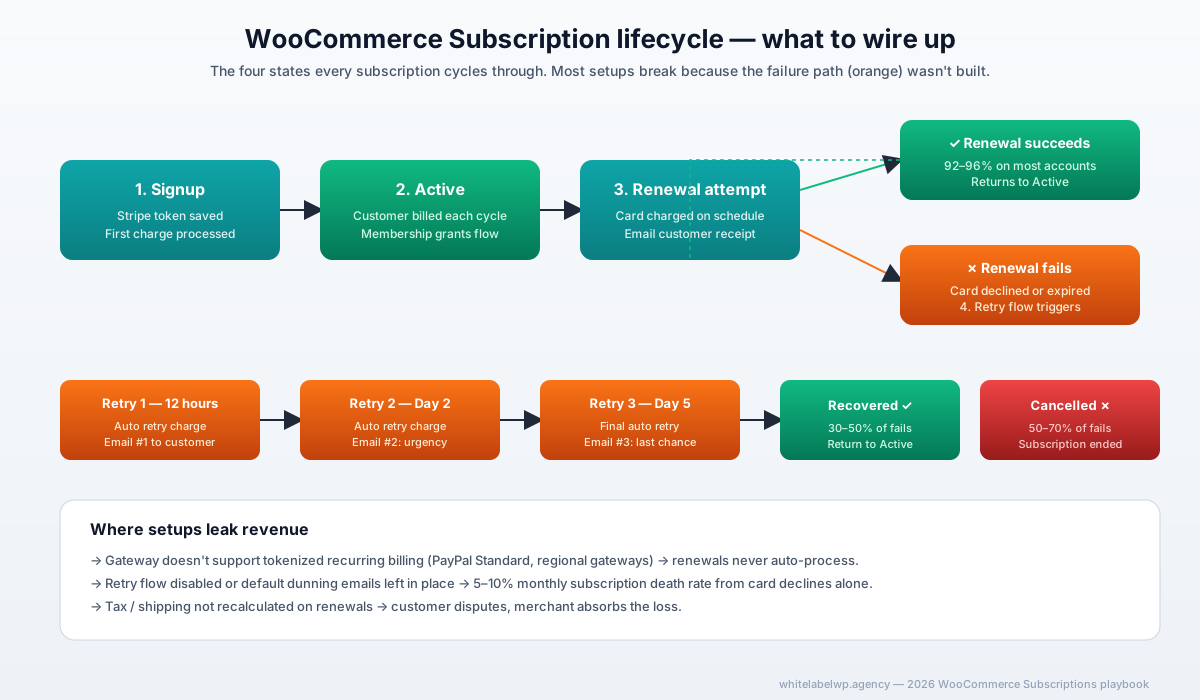
A WooCommerce Subscriptions setup that doesn’t break checkout requires four things in this order: the right payment gateway with token-based recurring support (Stripe is the safest default), a clean simple or variable subscription product configuration, tax and shipping rules tested against real recurring orders, and a renewal failure flow that retries cards and emails the customer before the subscription dies. Done in that order, the setup runs in a single sprint and renewal rates hit 92-96% on most accounts.
Honestly, half the WooCommerce subscription disasters we get called into clean up trace back to one decision: somebody picked PayPal Standard as the gateway. PayPal Standard does not support automatic recurring billing. Use Stripe.
When WooCommerce Subscriptions is the right answer (and when it isn’t)
WooCommerce Subscriptions makes sense when the client wants subscription commerce inside their existing WordPress + WooCommerce stack — same admin, same theme, same plugin ecosystem, same care plan. For a marketing agency client running content, brand, and a small product line, that integration is usually worth more than the slight cost of running it on WordPress versus a hosted platform.
Where it isn’t the right answer:
- High-volume B2C subscription businesses doing $1M+ in MRR. At that scale, dedicated subscription billing platforms like Stripe Billing or Chargebee handle dunning, revenue recognition, and analytics more cleanly than WooCommerce does. WooCommerce can hold its own up to a few thousand active subscribers, then strains.
- B2B subscription with complex usage-based pricing. WooCommerce can be made to do this with custom code, but the rebuild cost usually exceeds Chargebee or Stripe Billing for the same outcome.
- Sites that need offline gateway integrations. Most regional gateways don’t support WooCommerce’s subscription token model. If the only available gateway is one of those, subscriptions can’t run on auto-renew at all.
For everything else — DTC product subscriptions, content membership recurring billing, B2B SaaS up to a few thousand seats, retainer billing for service businesses — WooCommerce Subscriptions is solid.
The four pieces that actually matter
The setup has many configurations. Most don’t matter for getting it right. Four do:
- Payment gateway. Must support tokenized recurring billing. Stripe, Authorize.net CIM, Square, PayPal Commerce with Vault, Mollie. Not PayPal Standard. Not anything else.
- Subscription product structure. Simple subscription for one tier; variable subscription for multi-tier (“Monthly $29 / Yearly $290”). Get this wrong and customers can subscribe to the wrong plan or get charged twice.
- Tax and shipping rules. WooCommerce calculates tax and shipping per renewal. If the client is in a tax jurisdiction with complex rules (US states with internet sales tax, EU VAT-OSS), test renewals against real edge-case orders before launch.
- Renewal failure flow. The single biggest revenue leak in WooCommerce Subscriptions setups. Without retry logic and customer email touch points, 5-10% of subscriptions die each month from declined cards alone.
Get those four right and the rest of the setup is plumbing.
Step-by-step setup
Step 1 — License and install
The official WooCommerce Subscriptions extension costs $279/year on a single-site license. Multi-site agency portfolios usually run the Woo Membership extension bundle which includes Subscriptions plus Memberships, Bookings, and others.
Install via WooCommerce → Extensions → Browse, or upload the ZIP from your WooCommerce.com account. Activate the license key in WooCommerce → Settings → Subscriptions.
Free alternatives (YITH Subscriptions, SUMO Subscriptions) exist but lag on gateway support and edge cases. For a real production agency build, pay for the official plugin.
Step 2 — Pick the payment gateway
The recommended default is Stripe. It’s the cleanest integration, has the best documentation, supports SCA (Strong Customer Authentication) for EU customers, and tokenizes cards reliably for recurring billing.
Install the WooCommerce Stripe Payment Gateway (free), connect via the Stripe API keys, and enable subscription support in the Stripe settings.
Alternative gateways that work:
- PayPal Commerce (with Vault enabled). Newer than PayPal Standard. Supports tokenized recurring billing. Don’t confuse with the legacy PayPal Standard, which does not.
- Authorize.net CIM. US-only, but solid for US-based clients with existing Authorize.net merchant accounts.
- Mollie. Strong European choice with VAT handling and SEPA Direct Debit recurring support.
- Square. US and a handful of other markets. Reliable for B2C subscription products.
Don’t use any gateway that doesn’t explicitly support “recurring” or “subscription” billing in its WooCommerce extension description. The renewal will fail.
Step 3 — Configure the subscription product
Two product types matter:
- Simple subscription — one tier, one price, one billing interval. “Monthly Coffee Subscription, $19/month.”
- Variable subscription — multiple tiers with attributes. “Membership: Monthly $29 / Quarterly $79 / Yearly $299.”
For variable subscriptions, set the billing interval, period, length (for fixed-term subscriptions like a 12-month membership), and trial period at the variation level, not the product level. This is the most common configuration mistake.
If the product has a free trial, set the trial period in days, weeks, or months. The first charge happens at trial end, not at signup. Test this — agencies routinely launch trial offers where the first charge fires immediately because the trial setting was on the wrong level.
Step 4 — Tax and shipping rules
WooCommerce calculates tax and shipping on every renewal, not just the initial order. That means if a tax rate changes between renewals, the customer’s renewal charge changes too. For US clients with internet sales tax, integrate a tax calculation service like TaxJar or Avalara — both have WooCommerce extensions.
For shipped subscription products, set up recurring shipping zones explicitly. WooCommerce’s “Shipping for Subscriptions” extension ($99) lets you offer different shipping costs on initial vs renewal orders, which matters for hybrid models (free shipping on first order, paid on renewals, or vice versa).
Test at least three scenarios before launch: domestic order with tax, international order without tax, and an order in a state with multiple tax rates (Texas, New York, California all have sub-jurisdictional rates).
Step 5 — Customer account flow
Customers need to be able to:
- View active subscriptions
- Update payment method
- Pause or cancel (if you allow it)
- Change subscription frequency or plan
- See past renewal orders and invoices
The default WooCommerce My Account → Subscriptions page handles most of this. Add the “All Products for Subscriptions” extension ($99) if you want customers to convert one-time products into subscriptions or vice versa.
Style the account page to match the client’s brand. Default styling is functional but obviously WooCommerce-default; spending 4-6 hours on the My Account page typically improves retention metrics by 10-15% because customers can self-serve instead of emailing support.
Step 6 — Renewal failure handling
This is where most setups leak revenue. Enable Automatic Payment Retry under WooCommerce → Settings → Subscriptions → Automatic Payment Retry. The default schedule is 12 hours, 2 days, 5 days, then cancellation. For most clients that’s fine.
Write the dunning email sequence yourself rather than relying on WooCommerce’s defaults:
- Day 0 (failure): “We couldn’t process your renewal” — friendly, no blame, link to update card
- Day 2 (after first retry): “Last chance to keep your subscription active” — adds slight urgency
- Day 5 (final retry): “Your subscription will cancel today unless you update your payment method”
With this flow, recovery rates on failed renewals typically run 30-50% before full cancellation. That’s the difference between a subscription book that grows month-over-month and one that bleeds 5-8% per month.
Step 7 — Email and notification setup
Beyond dunning, configure these emails:
- Initial purchase confirmation
- Renewal order processing (sent before the renewal)
- Renewal order completed
- Subscription cancelled
- Subscription expired (for fixed-term)
- Subscription on-hold
- Customer renewal invoice (if you allow manual renewals)
Test each email at staging using a test card before launch. The renewal-order-processing email is especially important — customers who get surprised by a charge they forgot about churn faster than customers who got a heads-up email two days before.
Step 8 — Pre-launch test cycle
Before the gateway goes live, run a full test cycle in Stripe’s test mode (or the equivalent for your gateway):
- New customer signup with a test card
- Successful renewal (fast-forward the subscription clock if your gateway supports it)
- Failed renewal with retry flow
- Customer-initiated cancellation
- Customer-initiated payment method update
- Refund of a renewal order
Document each pass. Fix anything that breaks. Then switch to live mode.
Common ways WooCommerce subscriptions break
After running hundreds of subscription builds, the same problems show up:
- Wrong gateway choice (usually PayPal Standard). Renewals never auto-process. Customer thinks they cancelled; agency gets the email a month later.
- Trial timing on the wrong product level. First charge fires at signup instead of trial end.
- No dunning email sequence. Subscriptions cancel silently after the retry window. 5-10% monthly churn from this alone.
- Tax calculation forgotten on renewals. Renewal charges differ from initial charges; customer disputes the difference; merchant takes the loss.
- Shipping configured only for initial order. Renewal orders ship at the wrong cost or fail to ship at all.
- Account page that customers can’t navigate. They email support to cancel instead of self-serving; support churns harder than retention work would have.
- No SCA support for EU customers. Renewals require customer authentication that the default Stripe setup doesn’t handle. We’ve seen this kill an entire EU customer cohort.
Most of these are 30-minute fixes if caught in test mode. Catching them after launch costs days.
When to use Stripe Billing or Chargebee instead
WooCommerce Subscriptions hits its ceiling around 2,000-5,000 active subscriptions or when the client needs:
- Sophisticated dunning logic (multiple retry schedules, channel preferences)
- Usage-based or metered billing
- Revenue recognition and SaaS analytics out of the box
- Multiple subscription products with cross-product logic (e.g., “upgrade to annual gets a 20% credit toward the next add-on”)
- Headless commerce where WordPress is just a content layer
For those cases, recommend Stripe Billing or Chargebee as the billing engine, with WordPress as the marketing site and customer portal. The integration is more work but the scaling story is much better.
What the build should cost
For a standard subscription product launch — 1-3 tiers, Stripe gateway, customer account dashboard, branded email flow, retry logic, and one round of QA — US agencies typically bill clients $6,000-$15,000. White-label cost to the agency runs $3,000-$7,500 depending on complexity.
Larger setups — multi-gateway, B2B variable pricing, custom dunning, integration with the client’s CRM — run $20,000-$50,000 to the client and $10,000-$25,000 white-label.
For agencies running 1-2 subscription builds a year, project pricing makes sense. For agencies doing 1+ per quarter, folding the work into a Pro or Max retainer usually saves 20-30% across the year.
Where White Label WP Agency fits
We build WooCommerce subscription deployments end-to-end under the agency’s brand. The eight-step playbook above is what we run on every engagement — same checklist, same QA cycle, same dunning flow. Our WooCommerce service documents the scope.
If you have a subscription product launch in pipeline and want a partner who’s shipped 200+ of these on the same playbook, book a 30-minute partner call. We’ll talk through your specific gateway, tax jurisdiction, and product structure.
Frequently asked questions
Can I set up WooCommerce Subscriptions without the official plugin?
Technically yes, but not recommended for production. Free alternatives like YITH Subscription or SUMO Subscriptions cover basics but lag the official WooCommerce Subscriptions plugin on payment gateway compatibility, renewal handling, and edge cases like trials and prorated upgrades. For a real agency client engagement, the $279/year official plugin is the safer call.
Which payment gateway should I use with WooCommerce Subscriptions?
Stripe is the safest default — it supports tokenized recurring billing natively and integrates with WooCommerce Subscriptions out of the box. PayPal Standard does not support automatic renewals on subscriptions; only PayPal Reference Transactions or PayPal Commerce with Vault enabled does. Authorize.net CIM, Square, and Mollie also work. Never use a non-tokenizing gateway for subscriptions; the renewal will fail every time.
How do I handle failed renewal payments in WooCommerce Subscriptions?
WooCommerce Subscriptions has a built-in retry system that re-attempts failed payments at configurable intervals (default 12 hours, 2 days, 5 days). Enable it under WooCommerce → Settings → Subscriptions → Automatic Payment Retry. Then write a clear “your payment failed” email sequence that explains what happened, gives the customer an update-card link, and warns before cancellation. With this setup, recovery rates on failed renewals typically run 30-50% before the subscription is fully cancelled.
Does WooCommerce Subscriptions work with WooCommerce Memberships?
Yes, and they’re designed to work together. WooCommerce Memberships handles gated content and access control; WooCommerce Subscriptions handles the recurring billing that grants the membership. Together they’re the standard agency stack for membership sites built on WordPress. Both are official Woo plugins, both cost $279/year, or bundled in the Woo Membership extension package.
How much does it cost to build a WooCommerce subscription site in 2026?
For a typical subscription product launch with 1-3 subscription tiers, a payment gateway, customer account dashboard, and email flows, US-based agencies bill clients $6,000-$15,000 for the build. Larger setups with custom logic, multiple gateways, or B2B variable pricing run $20,000-$50,000. White-label cost to the agency runs roughly 40-50% of the client price.
Can I migrate Stripe Billing customers to WooCommerce Subscriptions?
Yes, but it’s manual. There’s no automated migration tool. The process: export Stripe customers and their subscription metadata, create matching WooCommerce subscriptions with payment method tokens preserved, and verify renewal triggers in WooCommerce against the Stripe schedule. Expect 1-3 weeks for 100-1,000 subscribers depending on plan complexity. Test thoroughly in Stripe’s test mode before touching live data.
Can a white-label developer build the full WooCommerce subscription setup for my client?
Yes. White Label WP Agency builds WooCommerce Subscriptions deployments end-to-end under the agency’s brand and NDA — including payment gateway setup, subscription product configuration, customer account pages, email flows, and the renewal failure handling that most agencies forget. The agency stays client-facing; the partner is invisible. Pro and Max retainers absorb most subscription builds inside included hours.