Elementor vs Bricks Builder: Honest Comparison for Agency Partners
Honest comparison of Elementor vs Bricks Builder for agency builds in 2026. Pricing, performance, ecosystem, and where each one is the right choice.
Elementor vs Bricks Builder: Honest Comparison for Agency Partners
For agency builds in 2026, Bricks Builder wins on performance and developer ergonomics, Elementor wins on team familiarity and third-party plugin support, and the right choice depends on whether your team optimizes for speed-of-build or speed-of-page. Bricks at $249/year unlimited sites is cheaper to scale than Elementor Pro’s $999/year Agency plan. Both produce production-ready sites; neither is “better” in the abstract.
If we’re being specific about scenarios: SEO-focused agencies with one experienced WordPress lead usually standardize on Bricks. Generalist agencies with mixed-skill teams usually stay on Elementor. Most don’t need to switch the ones that work.
TL;DR — at a glance
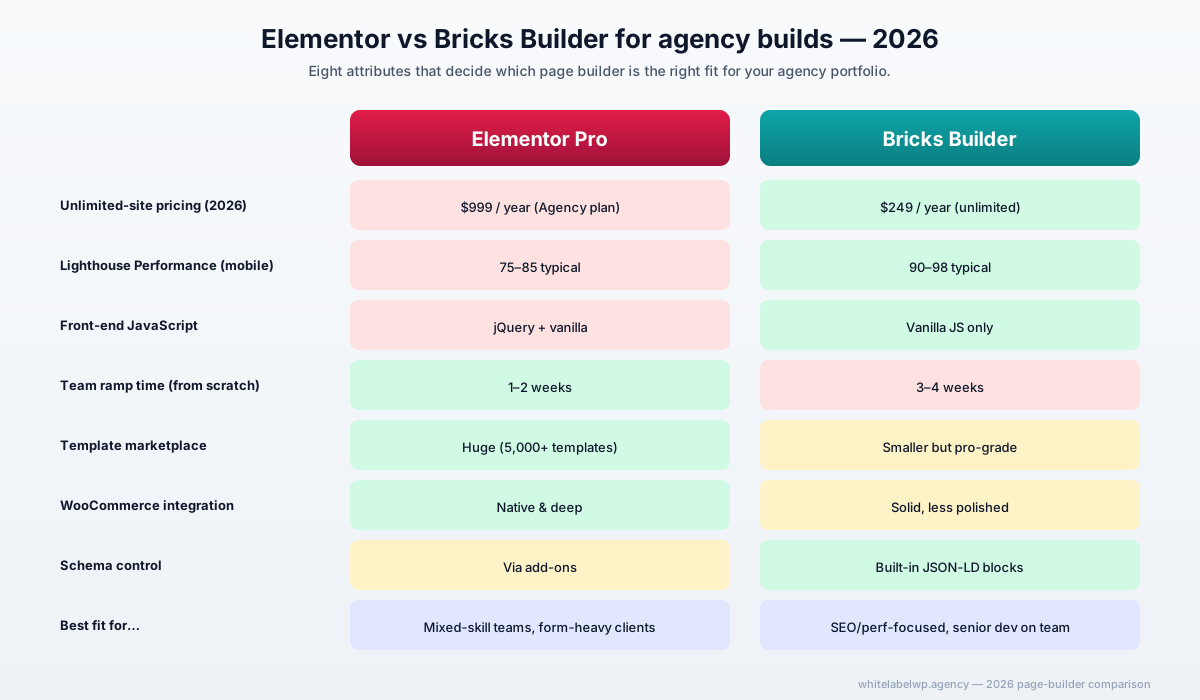
| Attribute | Elementor | Bricks Builder |
|---|---|---|
| Best for | Mixed-skill teams, form-heavy sites | SEO-focused agencies, performance-critical builds |
| Starting price | $59/year (Pro, 1 site) | $249/year (unlimited sites) |
| Agency unlimited | $999/year | $249/year |
| Front-end performance | 75-85 Lighthouse typical | 90-98 Lighthouse typical |
| Plugin/template ecosystem | Massive, mature | Smaller but professional-grade |
| Learning curve for new team | 1-2 weeks | 3-4 weeks |
| WooCommerce integration | Deep, native | Solid, less polished |
| Custom theme replacement | Yes | Yes |
Elementor — at a glance
Elementor has been the default WordPress page builder for agency work since around 2018. As of 2026 it powers roughly 17% of all WordPress sites tracked by BuiltWith, which is roughly 7-8% of the entire web. The Pro version has matured into a dependable, broadly-supported tool with one of the largest third-party plugin ecosystems in WordPress.
For agency teams already standardized on Elementor — meaning everyone on the team can open the editor and ship a section without help — the case for switching is weaker than the case for sharpening what’s already in place. Familiarity matters in delivery economics; ramping a team onto a new builder costs 40-80 hours of senior time that doesn’t ship client work.
Where Elementor shines
- Team ramp speed. Junior staff get productive in 1-2 weeks. Drag-and-drop, visual feedback, no required HTML/CSS knowledge for most pages.
- Form ecosystem. Elementor Forms, Forminator, Fluent Forms, and Gravity Forms all integrate cleanly. For lead-gen-heavy agency clients, this matters.
- Template marketplace. Envato, TemplateMonster, and Elementor’s own library — 5,000+ ready templates that can be adapted in hours.
- Plugin compatibility. Most WordPress plugins built in the last five years assume Elementor compatibility. WooCommerce extensions, page-builder add-ons, marketing tools — they almost always work out of the box.
- Hosted version with Elementor Cloud. For agencies that want fully-managed infrastructure, the Cloud product simplifies deployment.
Where Elementor might not fit
- Performance for SEO-critical clients. Even Elementor 3.27+ still ships some legacy JavaScript. On equivalent designs we benchmark Bricks 10-15 Lighthouse points higher on Performance. For agencies competing on Core Web Vitals as a ranking lever, that gap costs real positions.
- Cost at scale. The Agency unlimited plan at $999/year is reasonable for a single agency, but if you’re managing 50+ client sites, the math gets pricey.
- Code bloat on complex pages. Long pages with heavy widget stacks generate substantial DOM nodes. Optimizable, but it’s optimization work.
Bricks Builder — at a glance
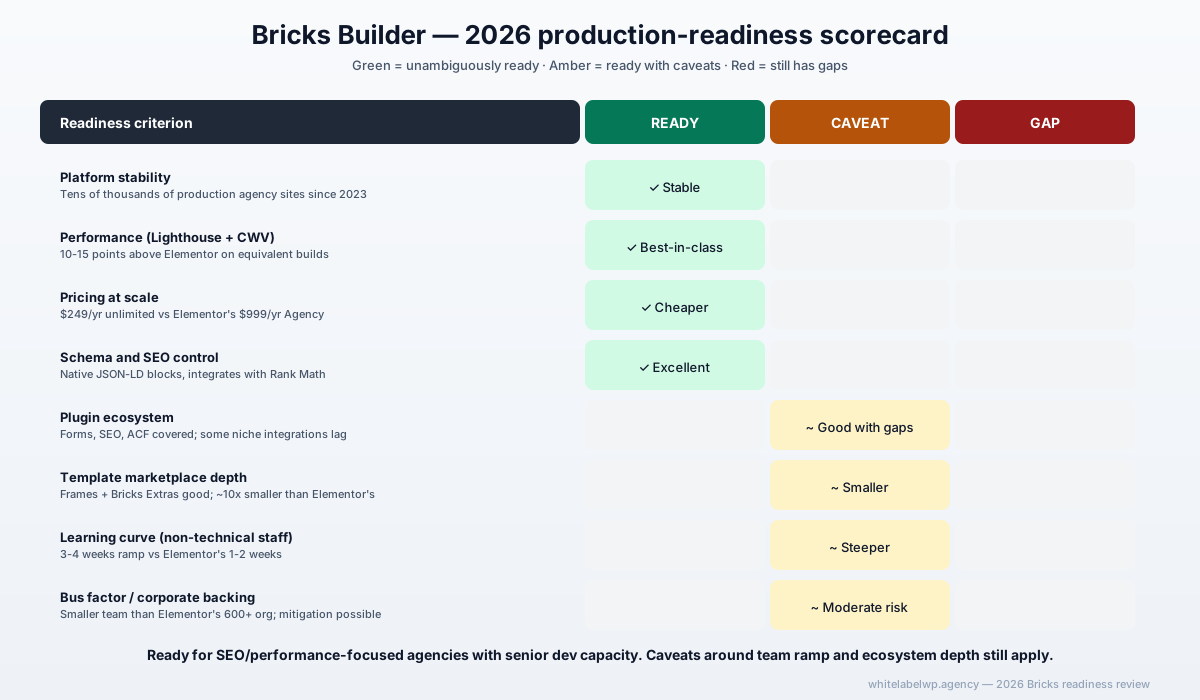
Bricks launched in 2021 and reached production-readiness around 2023. By 2026 it’s the fastest-growing premium page builder in WordPress, with BuiltWith showing roughly 5x year-over-year adoption growth as agencies migrate off Elementor for performance reasons. Bricks builds in a hybrid mode — visual editing with first-class CSS controls and direct HTML output, no Shadow DOM, no jQuery dependency.
It’s a developer’s page builder more than a designer’s page builder. For teams with at least one person who’s comfortable in Chrome DevTools, Bricks unlocks ergonomics that Elementor can’t match. For teams without that person, the learning curve gets in the way.
Where Bricks shines
- Front-end performance. No jQuery, minimal JS, semantic HTML output. Lighthouse Performance scores in the 90-98 range are routine on real client builds.
- Pricing for agencies. $249/year for unlimited sites is roughly $750 cheaper annually than Elementor’s Agency plan. Across 30 sites that’s $25/site/year vs Elementor’s $33/site/year.
- CSS-first architecture. The Bricks ecosystem integrates with Automatic.css, Core Framework, and Frames — all of which let agencies standardize design tokens, spacing, and typography across an entire client portfolio.
- Schema control. Direct JSON-LD injection in templates means structured data is far easier to get right than wrestling with Elementor’s schema add-ons.
- Custom dev escape hatch. Bricks’ query loops and PHP hook system make custom dev work feel like working with WordPress directly, not against a builder.
Where Bricks might not fit
- Team ramp time. Plan 3-4 weeks for a team coming from Elementor or no builder. Junior staff without CSS literacy struggle more here than they would on Elementor.
- Template marketplace. The Bricks ecosystem is smaller. Frames (the leading template library) is excellent but covers maybe 1/10th the use cases Elementor’s marketplaces do.
- Some plugin gaps. Forms ecosystem is solid (WS Forms, Bricks Forms, Fluent Forms) but the breadth of pre-built integrations is narrower. Some Elementor-specific extensions don’t have Bricks equivalents.
- Bus factor. Bricks is built by a smaller team (Thomas Koschwitz and core staff). Elementor has corporate backing and 600+ employees. For agencies that worry about long-term tooling risk, Elementor is structurally lower-risk.
Side-by-side comparison (detailed)
| Dimension | Elementor | Bricks Builder |
|---|---|---|
| Pricing — 1 site | $59/year (Pro) | Not offered (unlimited from start) |
| Pricing — 25 sites | $299/year (Expert plan) | $249/year (unlimited) |
| Pricing — unlimited | $999/year (Agency) | $249/year |
| Lifetime license | No | $299 (limited-time) |
| Front-end JS framework | jQuery (legacy) + vanilla | Vanilla JS only |
| Generates inline CSS | Yes (configurable) | No (external stylesheet) |
| WooCommerce builder | Native, deep | Solid, less polished |
| Custom theme replacement | Yes (Theme Builder) | Yes (full theming) |
| Mobile-first responsive | Breakpoint controls | First-class responsive primitives |
| Schema control | Via add-ons (mostly) | Built-in custom code blocks |
| Query loops | Pro only | Built-in, more flexible |
| Hooks and PHP filters | Available | Available, more accessible |
| Migration tools | N/A | Elementor → Bricks plugin (partial) |
| Page builder market share (2026) | ~17% of WP sites | ~2-3% but growing fast |
Performance — what the benchmarks actually say
Across the agency builds we’ve shipped on both, here’s the typical gap on equivalent designs (same layout, same content, same hosting):
- Lighthouse Performance (mobile): Elementor 75-85, Bricks 90-98
- Largest Contentful Paint: Elementor 1.8-2.6s, Bricks 1.2-1.8s
- Total Blocking Time: Elementor 200-400ms, Bricks 50-150ms
- Cumulative Layout Shift: Roughly equivalent if both are built carefully
The performance gap is real but contextual. Elementor pages with heavy lazy-loading, optimized images, and a good CDN can hit 90+ Lighthouse scores too — it just takes more optimization work. Bricks reaches the same scores out of the box with less tuning.
For SEO-driven clients where every Core Web Vitals improvement compounds into ranking gains, the gap is worth real money. For brand or brochure sites where the difference between 85 and 95 Lighthouse doesn’t affect business outcomes, it’s a tiebreaker, not a deciding factor.
Developer experience and team ramp-up
The team learning curve is the most underrated comparison axis. Here’s the typical pattern:
Elementor team coming from Elementor: No ramp. Productive day one.
Elementor team trying Bricks for the first time: 3-4 weeks to production-ready output. Senior dev productive in 1 week, junior staff struggle without CSS literacy.
Bricks team trying Elementor: 1-2 weeks. Most concepts translate; the visual model is similar.
New team learning either: Elementor 1-2 weeks, Bricks 3-4 weeks.
The honest implication: switching a working team between builders has hidden cost. Unless the performance gap solves a real client problem, “Bricks is faster” isn’t enough reason to ramp a team that’s already productive on Elementor.
Cost across an agency’s portfolio
Pricing math at 2026 rates:
| Portfolio size | Elementor cost/year | Bricks cost/year | Difference |
|---|---|---|---|
| 5 sites | $299 (Expert) | $249 (unlimited) | $50 |
| 25 sites | $299 (Expert) | $249 (unlimited) | $50 |
| 50 sites | $999 (Agency) | $249 (unlimited) | $750 |
| 100 sites | $999 (Agency) | $249 (unlimited) | $750 |
At small portfolio sizes the difference is rounding-error. Past 30-50 sites it becomes meaningful but rarely the deciding factor — even $750/year is small against the cost of switching builders mid-portfolio.
How to choose between them
Choose Elementor if:
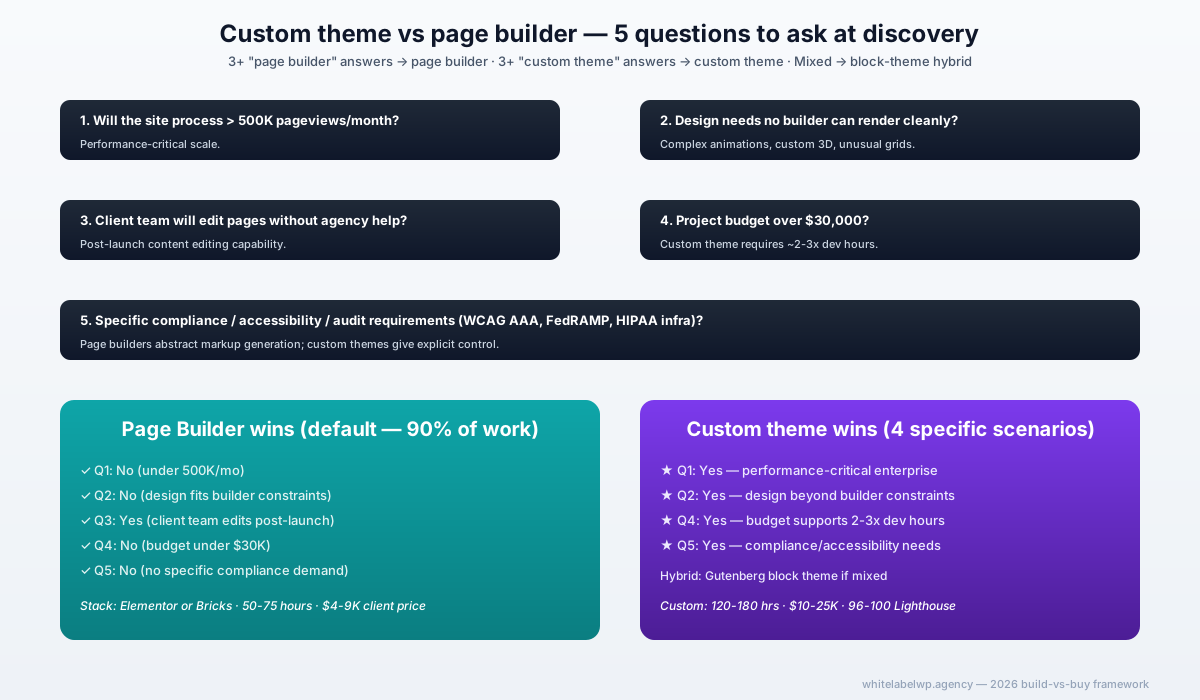
- Your team is already productive on it. Switching cost beats license savings.
- Your client mix is form-heavy, lead-gen-focused, or WooCommerce-heavy.
- You need maximum template marketplace coverage.
- You have junior or non-technical staff doing builds.
Choose Bricks if:
- Your team has at least one developer comfortable in HTML/CSS/Chrome DevTools.
- Your client mix is SEO-focused and Core Web Vitals matter to outcomes.
- You’re building a fresh agency stack with no Elementor inertia.
- You want one license to cover an unbounded portfolio.
Choose to stay where you are if:
- The above doesn’t make a clear case for switching. Builder churn costs 40-80 hours of senior time per migration. Switching needs to clear that bar.
When to use both (hybrid stack)
Some agencies run both in parallel — Elementor for the marketing-and-forms-heavy clients, Bricks for the SEO-and-performance-critical ones. The hybrid stack works but requires two ecosystems of plugins, two team workflows, and two QA approaches. We see this work cleanly when the agency has 10+ developers and a defined splitter on which clients get which builder. For smaller agencies, pick one and commit.
Where White Label WP Agency fits
We build in whichever page builder the agency has standardized on. If your team builds in Elementor, we build in Elementor. If you’re on Bricks, we build on Bricks. We’re not in the business of pushing you to switch — and our white-label model means whichever stack you pick, we adapt.
For agencies actively choosing a stack right now, we’ll walk through the tradeoffs with you based on your client mix and team makeup. Our page-builder development service is documented; our retainer plans absorb builds in either builder. Book a partner call if you’d like to talk through what fits.
Frequently asked questions
Is Bricks Builder faster than Elementor in 2026?
Yes, measurably. Bricks generates cleaner front-end markup with no jQuery dependency, while Elementor still ships some legacy JavaScript even in version 3.27+. On real-world agency builds, Bricks pages typically score 8-15 Lighthouse points higher on Performance and load 200-600ms faster on mid-range mobile devices. For SEO-driven clients where Core Web Vitals matter to ranking, Bricks gives more headroom without aggressive optimization work.
Can an Elementor site be migrated to Bricks Builder?
Yes, but not automatically. The Elementor-to-Bricks conversion plugin handles basic page structures but doesn’t translate custom widgets, dynamic content, or Elementor Pro-specific features. For a typical 10-20 page agency site, expect 60-70% to migrate semi-automatically and 30-40% to be rebuilt. The work usually costs less than a redesign because the design and content stay; only the builder layer changes.
Is Bricks Builder good for agencies that don’t have a senior developer?
It can be, but the learning curve is steeper than Elementor’s. Bricks assumes some HTML/CSS literacy — for an agency team coming from drag-and-drop only, plan 2-3 weeks of ramp before production-grade builds. Once the team is up, build times typically match or beat Elementor. Agencies with junior teams or non-technical staff usually stick with Elementor for that reason alone.
How much does Bricks Builder cost for agency use in 2026?
Bricks Builder costs $249/year for unlimited sites with full support and updates, or $299 for a lifetime license (limited-time tier — Bricks may discontinue it). Elementor Pro for the equivalent unlimited-site usage runs $999/year on the Agency plan. For an agency building 20+ sites a year, Bricks is roughly $750/year cheaper.
Does Bricks Builder have enough plugin and template ecosystem for agency work?
Yes for most agency needs in 2026, no for some edge cases. The Bricks marketplace has matured — Frames, Bricks Extras, Automatic.css, and Core Framework cover most build patterns. Where it lags: deep integrations like Elementor’s HubSpot connector, native WooCommerce extensions, and the breadth of pre-designed templates. If the client mix is form-and-funnel heavy, Elementor’s ecosystem advantage matters; for content and brochure sites, Bricks is enough.
Which page builder is better for SEO-focused agencies?
Bricks, in 2026. The performance edge from cleaner markup and no jQuery directly improves Core Web Vitals scores, which Google has confirmed as a ranking factor. Bricks also gives more granular schema control via its custom code blocks and integrates cleanly with Rank Math or Yoast. Elementor’s SEO performance has improved a lot but Bricks still wins on the structural metrics that compound across a portfolio of client sites.
Can a white-label WordPress partner build in either Elementor or Bricks?
Yes. White Label WP Agency builds in whichever page builder the agency client has standardized on — Elementor, Bricks, Divi, or a custom theme. If your agency hasn’t standardized yet, we’ll discuss the tradeoffs and let you decide rather than push a stack on you. The decision should be yours; we adapt.