Squarespace to WordPress Migration: The Agency Playbook
The four-phase Squarespace to WordPress migration playbook for agencies. URL mapping, Commerce port, ranking preservation, and real cost math.
Squarespace to WordPress Migration: The Agency Playbook
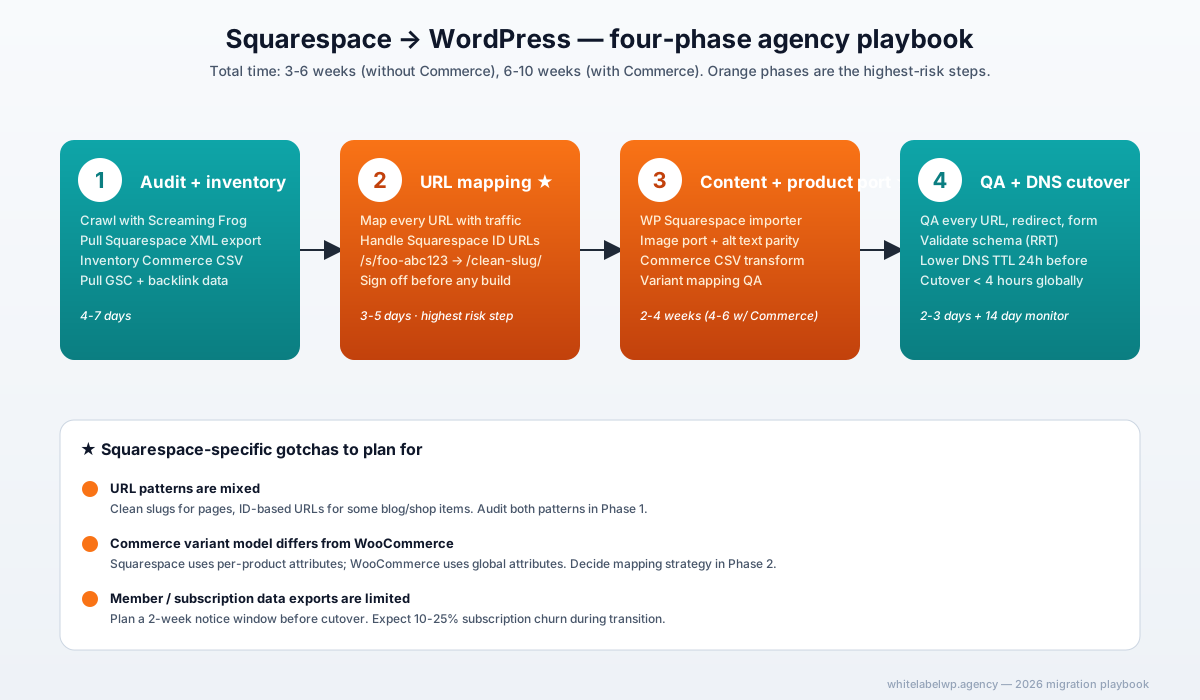
A Squarespace to WordPress migration that preserves rankings and revenue requires four ordered phases: inventory the Squarespace site fully (pages, products, blog posts), build a URL-mapping spreadsheet that handles Squarespace’s non-standard URL patterns, port content and product data into WordPress with the structure preserved, then cutover DNS with 301 redirects in place. Squarespace migrations carry slightly more ranking risk than Wix or Webflow migrations because Squarespace’s URL structures and SEO metadata controls are looser. Agencies typically deliver in 3-6 weeks for sites under 50 pages, 6-10 weeks for larger sites with active Squarespace Commerce.
Honest version: Squarespace migrations aren’t harder than Wix migrations, but they fail in different places. The mistake to avoid is treating them like a Wix migration with the platform name swapped.
Why agencies migrate clients off Squarespace in 2026
The reasons are similar to Wix migrations but the triggers tend to be different. Agency clients on Squarespace typically reach the migration decision through one of three paths:
- The marketing team outgrew the SEO controls. Squarespace’s metadata, schema, and redirect tooling is meaningfully thinner than what Rank Math or Yoast provide on WordPress. SEO-driven clients hit this ceiling around month 18 of serious organic investment.
- Squarespace Commerce hit a scaling wall. Squarespace’s commerce engine works fine for $0-$500K annual revenue but starts feeling constrained at $500K+ — particularly on payment gateway choice, custom checkout, and subscription complexity.
- The agency consolidated a multi-platform stack. Client had Squarespace for the brand site, Shopify for commerce, and a separate blog on Medium or Substack. The economics of consolidating to one WordPress estate compound across 3+ year retention.
The cost economics in 2026: Squarespace Business plan starts at $23/month annual with Commerce Advanced at $65/month. A comparable WordPress stack (hosting + Rank Math Pro + WooCommerce + essential plugins) runs $30-$60/month. Across 30 client sites that’s $200-$1,000/month in savings — meaningful but rarely the primary driver. Control is the driver; cost is the tiebreaker.
What makes Squarespace migrations different from Wix or Webflow
Three structural differences shape the migration playbook:
-
URL patterns are mixed. Squarespace uses clean slugs for most pages (
/services/branding) but defaults to ID-based URLs for blog posts and shop items in some configurations (/blog/foo-abc123,/shop/all-products/p/widget-name). The URL audit needs to capture both patterns and decide redirect strategy for each. -
Squarespace Commerce variant model differs from WooCommerce. Squarespace treats variants as attributes on a single product; WooCommerce supports both attribute-variants and standalone product variations. Mapping needs careful attention to SKU continuity and inventory state at the moment of cutover.
-
Native member/subscription data exports are limited. Squarespace’s member exports include basic profile data but not subscription state, payment tokens, or last-charged metadata. Active subscription migration usually requires a 2-week member notification window and a payment-method re-authorization step post-cutover.
These differences don’t make the migration harder; they just change which steps need the most attention.
The four-phase migration playbook
Phase 1 — Audit and inventory
The same crawl-and-document discipline that powers Wix migrations applies here, with three Squarespace-specific extras:
- Crawl the site with Screaming Frog or Sitebulb. Export every URL with status, title tag, meta description, H1, and inbound internal link count. Standard step.
- Pull the Squarespace site export. Squarespace offers an XML export under Settings → Advanced → Import/Export. The export covers pages, blog posts, and some product data — but not all. Note the gaps in writing.
- Inventory Squarespace Commerce separately if applicable. Products, variants, customer records, order history, subscription state. Squarespace’s CSV export is the source of truth.
- Pull Google Search Console data for the past 12 months. Identify URLs with 5+ organic clicks in the last 90 days — these are your high-stakes redirect targets.
- Pull backlink data from Ahrefs, Semrush, or Moz. Anything from a DR 30+ domain becomes a redirect priority.
Phase 1 deliverable: a master spreadsheet with one row per Squarespace URL, including title, H1, traffic data, and inbound link signals. Allow 4-7 days for a typical site.
Phase 2 — URL mapping and SEO preservation
The decision phase. For each row in the master spreadsheet, decide:
- Does this URL move 1:1 to WordPress with the same slug?
- Does it need a slug rewrite (e.g., Squarespace ID-based URL → clean WordPress URL with 301 redirect)?
- Should it consolidate with another URL (combining two thin pages into one stronger page)?
- Should it be sunset (low-traffic legacy pages that aren’t worth migrating)?
The hard rule from the Wix playbook applies here: every URL with organic traffic in the past 12 months must have a defined target. No exceptions.
Squarespace’s /blog/post-id-abc123 URLs deserve special attention. These need a 301 from the old ID-based URL to a clean WordPress URL like /blog/post-slug/. WordPress’s permalink structure plus Rank Math’s redirect manager handles this cleanly.
For sites with category and tag taxonomies, map Squarespace’s tag system to WordPress’s tag and category model. They aren’t identical — Squarespace tags are flat, WordPress categories are hierarchical.
Phase 2 deliverable: complete URL map signed off by the agency before any WordPress build work begins. Allow 3-5 days.
Phase 3 — Content and product port
Three workstreams run in parallel here:
Content port. Use the Squarespace XML export plus the WordPress importer (Tools → Import → Squarespace). The importer handles 50-60% of typical Squarespace content cleanly. The rest — heavily formatted blog posts, custom code blocks, embedded content, complex layouts — needs manual rebuilding page by page on staging WordPress.
Image port. Squarespace images live on Squarespace’s CDN. Download every image, optimize (TinyPNG or Squoosh), and upload to WordPress media library with descriptive alt text matching the SEO inventory. This is the time-consuming step on image-heavy brand sites.
Squarespace Commerce port (if applicable). Export products as CSV from Squarespace Settings → Commerce → Export. Transform the CSV to match WooCommerce’s import schema using WP All Import or a custom script. Variable products require special attention — Squarespace’s variation model uses attribute combinations, while WooCommerce supports both attribute variations and standalone variations.
Order history is typically not migrated (operationally complex, low value). Customer records migrate as WooCommerce customer accounts with a password-reset email sent at cutover.
Phase 3 deliverable: staging WordPress site with all content, images, and products in place. Allow 2-4 weeks for 50-page sites; 4-6 weeks for sites with active Commerce.
Phase 4 — Pre-launch QA and DNS cutover
Same QA discipline as the Wix migration playbook:
- Every URL in the migration spreadsheet exists on WordPress staging
- Every Squarespace → WordPress redirect is configured (in Redirection plugin or .htaccess)
- Page titles, H1s, meta descriptions match the inventory
- Images load with correct alt text
- Internal links point correctly
- Forms submit successfully
- Squarespace Commerce → WooCommerce: every product SKU resolved, every variant tested, payment gateway tested in sandbox mode
- Schema validates in Google’s Rich Results Test
- Mobile rendering verified across breakpoints
DNS cutover: lower the TTL on Squarespace’s DNS 24 hours before cutover. At cutover time, point the A record (or CNAME) to the WordPress host. Switch off the WordPress indexability block, submit the new sitemap to Google Search Console, and use the Change of Address tool if the domain is changing too.
Post-launch monitoring follows the same 14-day rhythm: GSC daily for crawl errors, rank tracking on top 20 keywords, analytics for organic traffic anomalies. Most ranking recovery happens by day 60; full recovery by day 90.
Handling Squarespace Commerce → WooCommerce specifically
The Commerce migration is the part most often underestimated. Three things to plan carefully:
Product attribute mapping. Squarespace lets sellers create custom attributes per product (color, size, material). WooCommerce uses global attributes that can be shared across products. The decision: replicate Squarespace’s per-product attribute model (more rebuild work but exact parity) or refactor to WooCommerce’s global model (cleaner long-term but more migration work). For most agency clients with under 200 products, the global model wins.
Payment gateway transition. Squarespace Commerce uses Stripe and PayPal natively. WooCommerce supports both, plus dozens of others, but the customer payment tokens don’t transfer directly. New customers post-migration enter card details fresh; returning customers from before migration need to re-enter their card on first new order.
Subscription state. Squarespace Commerce subscriptions don’t export with full state. If the client has active subscriptions, plan a 2-week member notification window: email subscribers explaining the migration, ask them to update payment details on the new platform, accept that 10-25% of subscriptions will churn during the transition. This is unavoidable; the goal is to minimize it, not eliminate it.
For agencies running 5+ Squarespace Commerce migrations per year, our WooCommerce service standardizes this workflow and absorbs the variant-mapping and subscription-notification work inside a Pro or Max retainer.
What a Squarespace to WordPress migration should cost
For a typical Squarespace site of 20-50 pages without commerce, US-based agencies bill clients $5,000-$14,000 for the managed migration. Add $4,000-$12,000 for Squarespace Commerce migration depending on product count and complexity. Membership migrations (active subscriptions) run $3,000-$8,000 additional.
White-label cost to the agency runs roughly 40-50% of the client price. A typical $9,000 content migration to a client costs the agency $3,600-$4,500 in partner fees, leaving 50-60% gross margin.
Larger projects with active Commerce, custom code blocks, or multi-site consolidation run $25,000-$60,000 to the client. A Pro retainer at $1,099/month typically absorbs one standard migration per month inside the included hours.
When NOT to migrate off Squarespace
Three scenarios where the right answer is staying put:
- Single-page brand site with no SEO investment. If the client gets minimal organic traffic and the site is essentially a digital business card, the migration cost exceeds the benefit.
- High-velocity Squarespace publishing team. If the client’s marketing team is fast and confident on Squarespace and the platform’s limits aren’t blocking outcomes, switching adds learning-curve drag without commercial upside.
- Active multi-year commerce with $200K+ in subscription revenue. The 10-25% churn during transition is real money. The migration economics need to justify the loss, which usually means the WordPress destination unlocks significantly better margins (lower payment fees, custom checkout, etc.).
Honest assessment beats reflexive migration recommendations. We’ve told agencies to leave clients on Squarespace when the math didn’t work.
Where White Label WP Agency fits
We run the full four-phase playbook as a white-label service. The agency stays client-facing; the partner is invisible. Our migration service documents the scope, including Squarespace-specific quirks like Commerce variant mapping and the member notification workflow.
For agencies running 1-2+ Squarespace migrations per quarter, folding them into a Pro or Max retainer usually saves 20-30% across the year versus per-project pricing. Book a partner call to walk through your specific pipeline.
Frequently asked questions
How long does a Squarespace to WordPress migration take?
For a 20-50 page Squarespace site without commerce, expect 3-6 weeks end-to-end. Add 2-4 weeks for Squarespace Commerce migration depending on product count (under 100 products fits the lower end; 500+ products and active subscriptions push to 8-10 weeks). The URL audit and mapping phase is the longest single step at 4-7 days for a typical site.
Will I lose Google rankings migrating from Squarespace to WordPress?
Not if 301 redirects are configured correctly, on-page content is preserved at parity or better, and the DNS cutover happens within a clean 24-72 hour window. Squarespace migrations carry slightly more ranking risk than other platform migrations because Squarespace’s URLs sometimes use IDs that need careful handling. Typical traffic dip in the first 30 days is 5-15%, with full recovery by day 90.
How do I migrate Squarespace Commerce products to WooCommerce?
Export products as CSV from Squarespace, transform the CSV to match WooCommerce’s import schema (using a tool like WP All Import or a custom script), then import into WooCommerce. Variable products, subscriptions, and digital products each have specific quirks — Squarespace’s variation model doesn’t map 1:1 to WooCommerce’s. Plan 1-2 days of mapping work plus QA on every variant SKU.
Can I migrate a Squarespace site with members or subscribers to WordPress?
Yes, but it requires more work than a content-only migration. Member data exports as CSV from Squarespace, then imports into WooCommerce Memberships or a comparable plugin. Active subscriptions need careful handling — the payment gateway tokenization usually doesn’t transfer, so members may need to re-authorize their payment method after migration. Plan for a 2-week notice period to members before cutover.
How much does a Squarespace to WordPress migration cost in 2026?
For a 20-50 page Squarespace site without commerce, US agencies charge clients $5,000-$14,000. Add $4,000-$12,000 for Squarespace Commerce migration depending on product count. Membership migrations run $3,000-$8,000 additional. White-label cost to the agency runs 40-50% of the client price.
What URL structure should I use on WordPress to preserve Squarespace SEO?
Match the existing Squarespace URL slugs where they’re clean. Use 301 redirects from any Squarespace ID-based URLs to clean WordPress permalinks. Never let an old high-traffic Squarespace URL return a 404 — set up redirects in the Redirection plugin before launch.
Can a white-label partner handle the full Squarespace to WordPress migration?
Yes. A white-label WordPress partner runs the full four-phase playbook under the agency’s brand and NDA, including the Squarespace-specific quirks (URL ID handling, Commerce variant mapping, member data preservation). Most agencies running 1+ Squarespace migrations per quarter fold the work into a Pro or Max retainer rather than billing per project.