How to Migrate from Wix to WordPress Without Losing Rankings
The agency-grade playbook for migrating Wix sites to WordPress without losing organic rankings. 10 steps, real cost math, and where most migrations fail.
A Wix to WordPress migration keeps existing organic rankings when every old Wix URL is 301-redirected to its new WordPress URL, the new site preserves on-page content at parity or better, and the DNS cutover happens fast enough that Google doesn’t see prolonged duplication. Done in that order, ranking loss is typically under 5% in the first 60 days and fully recovered within 90. Skip any of the three and the client’s traffic gets dented for months.
Honest version: the migration itself is straightforward. The ranking loss happens because someone skipped the boring URL-mapping spreadsheet.
Why agencies migrate clients off Wix in 2026
Two-thirds of the Wix-to-WordPress projects we run come from one of three triggers. The client’s marketing team has outgrown what Wix lets them do, the agency has scoped a redesign and decided “while we’re rebuilding, let’s also move the CMS,” or the client is consolidating multiple Wix sites into one WordPress estate they can actually manage.
The economics also shifted. As of 2026, a Wix Business plan starts at $36/month, with Business Elite at $159/month for the features most marketing teams actually need. A comparable WordPress setup — Kinsta Starter or WP Engine Startup hosting plus Rank Math Pro and a couple of essential plugins — runs $15-$30/month. Across 50 clients, that’s $700-$1,500/month in margin the agency can either keep or pass back.
The bigger driver is control. WordPress powers about 43% of all websites in 2026, which means the plugin ecosystem, the developer pool, and the SEO tooling depth simply doesn’t exist for Wix at the same level. When the client’s SEO consultant asks for schema overrides or a custom redirect rule, the answer on WordPress is “two clicks in Rank Math.” On Wix it’s “let me submit a feature request.”
The four ways a Wix to WordPress migration loses rankings
Almost every botched migration we’ve seen post-mortem traces back to one of four mistakes. Knowing them upfront keeps the work boring instead of dramatic.
Missing 301 redirects. Every URL that had any organic traffic must redirect to its new equivalent. If the old /services/branding Wix URL returns a 404 because no one set up the redirect, Google drops it from the index within two crawl cycles and the new /services/branding/ page on WordPress starts from scratch. We’ve seen agencies lose 30-40% of organic traffic from this alone.
URL structure mismatch. Sometimes the redirects exist but the new URLs are restructured (e.g., /services/branding becomes /what-we-do/brand-identity-services/) without any thought to how the internal anchor text and external backlinks point at the old structure. Redirects pass most of the link equity but not all of it, and the deeper the structural change, the more you lose.
On-page content drift. The new WordPress page doesn’t carry over the same H1, title tag, body copy, or internal anchor text the old Wix page had. Google sees a redirected URL pointing to a page that’s substantively different and treats it as a new page. Rankings reset.
Slow cutover window. The DNS change from Wix to WordPress takes 24-48 hours to propagate globally. During that window, some visitors see Wix and some see WordPress. If both sites stay live and indexable for more than a week, Google’s duplicate-content algorithms get confused, and one of the two versions usually drops out of the index entirely — often the wrong one.
Avoid all four and rankings hold. We’ve migrated 800+ sites with this rule and net traffic typically holds within 5% of pre-migration baseline in the first 30 days.
Pre-migration audit (don’t skip this)
Before any URL gets touched, you need three artifacts:
A complete URL inventory. Crawl the Wix site with Screaming Frog (free for up to 500 URLs) or Sitebulb. Export every URL, its title tag, meta description, H1, and any inbound internal links. This becomes the source-of-truth spreadsheet for the entire migration.
A ranking snapshot. Pull Google Search Console data for the past 12 months. For every URL with at least 5 organic clicks in the last 90 days, note the focus keyword, current position, and click volume. Those are your high-stakes URLs — the ones where a botched redirect costs real revenue.
A backlink profile. Use Ahrefs, Semrush, or Moz to pull every backlink pointing at the Wix site. Sort by referring domain authority. Anything above DR 30 is a URL you absolutely cannot afford to 404.
These three artifacts take a full day. Skipping them costs three months of recovery.
The agency-grade Wix to WordPress migration playbook
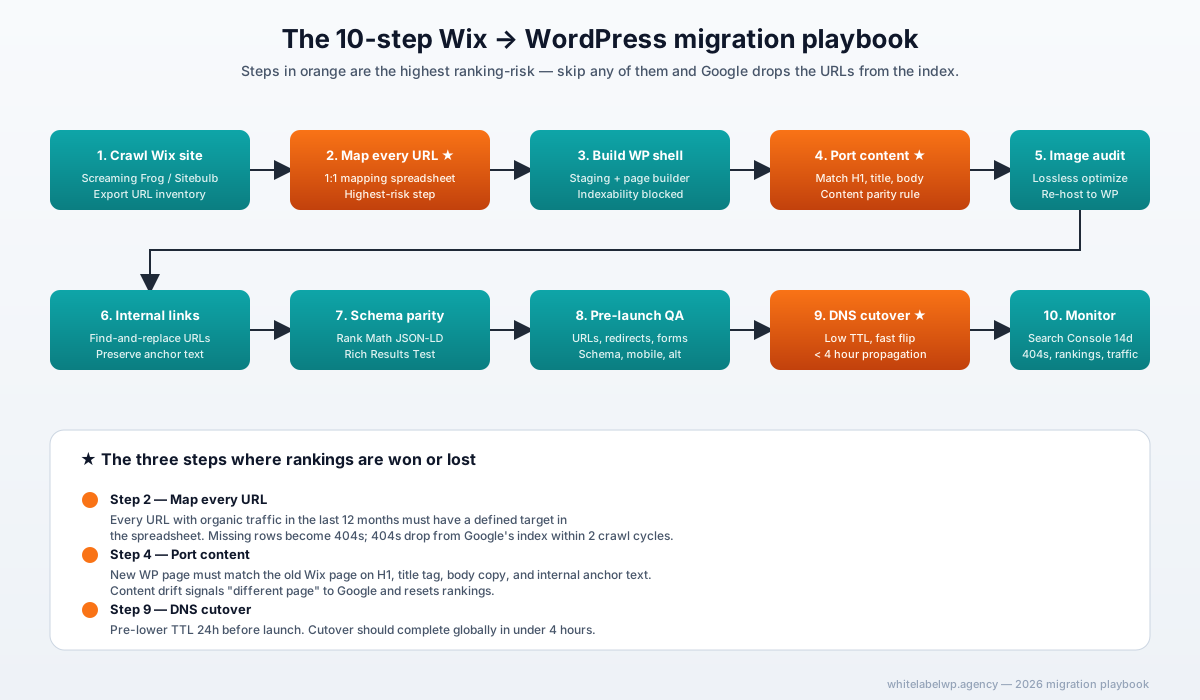
Here’s the 10-step sequence we use on every migration. Read it through once before quoting the project to your client.
Step 1 — Crawl the Wix site
Run Screaming Frog or Sitebulb against the Wix domain. Export every URL with status code, response time, meta data, H1, and word count. This is the master inventory.
Step 2 — Map every URL
In a spreadsheet, line up every Wix URL against its planned WordPress equivalent. For most agency clients, 80-90% of URLs can map 1:1 (same slug, same path depth). The remaining 10-20% need decisions — old auto-generated Wix URLs typically get cleaner WordPress slugs with a 301 from the old form.
The hard rule: every Wix URL that had any organic traffic in the past 12 months must have a row in this spreadsheet with a defined target. If you don’t know where it should go, it shouldn’t get migrated until you decide.
Step 3 — Build the WordPress shell on staging
Set up a WordPress install on staging (subdomain or separate hosting). Install the theme or page builder the client has agreed to — Bricks, Elementor, or a custom build. Configure permalinks to match the URL plan from Step 2.
Install Rank Math (or Yoast), the Redirection plugin, and any plugins the client’s stack needs (forms, CRM integration, analytics). Lock down the staging site with HTTP auth or an indexability block so Google doesn’t crawl it prematurely.
Step 4 — Port content (manual + plugin-assisted)
The CMS2CMS Wix to WordPress plugin and similar tools handle blog posts well — usually 60-70% automatic. They don’t handle Wix’s velo code, custom apps, Editor X visual layouts, or anything with embedded media reliably.
For the 30-40% that needs manual rebuilding, work page by page. Match H1, title tag, meta description, body copy, and image alt text to the existing Wix page exactly — at minimum at parity, ideally improved.
Step 5 — Image audit and rehosting
Wix images live on Wix’s CDN. After migration they need to live on the client’s WordPress media library (or a dedicated image CDN like Bunny or Cloudflare Images).
Download every image, run it through a lossless optimizer (TinyPNG, ImageOptim, or Squoosh), and upload to WordPress with descriptive alt text. Page speed often improves materially here — Wix’s CDN performs but isn’t always tuned for the geography the client’s audience lives in.
Step 6 — Internal link rebuild
Every internal link that used to point at a Wix URL needs to point at the new WordPress URL. Use the URL map from Step 2 as the find-and-replace reference.
Anchor text discipline matters here. If the old Wix internal link said “see our branding services” pointing at /services/branding, the new WordPress link should say “see our branding services” with the same anchor text. Changing anchors mid-migration is one of the subtler ways agencies lose ranking authority.
Step 7 — Schema parity
If the old Wix site had FAQPage schema, Article schema, or Organization schema, the new WordPress site needs the same — and better, because Rank Math gives more control than Wix did.
For agency clients running review schema, breadcrumbs, or LocalBusiness schema, audit each schema type on the existing site, then implement on WordPress via Rank Math’s Schema Generator or a custom JSON-LD block. Validate everything against Google’s Rich Results Test before launch.
Step 8 — Pre-launch QA checklist
Before the DNS cutover, run through this:
- Every URL in the migration spreadsheet exists on WordPress staging
- Every redirect from old Wix URL to new WordPress URL is configured (in Redirection plugin or .htaccess)
- Page titles, H1s, meta descriptions match the inventory
- Images load and have alt text
- Internal links go to staging URLs (these auto-flip when DNS cuts over)
- Forms submit successfully (test every form)
- Analytics tracking is installed
- Schema validates in Rich Results Test
- Mobile rendering checks pass on iPhone and Pixel screen sizes
This step takes 2-3 days for a 50-page site. Don’t compress it.
Step 9 — DNS cutover
The actual flip. Lower the TTL on the Wix domain’s DNS records 24 hours before cutover so propagation goes fast. At cutover time, point the A record (or CNAME) from Wix to the WordPress host. Most cutovers complete globally in under 4 hours when TTL was pre-lowered.
Inside the WordPress site, switch off the indexability block, submit the new sitemap to Google Search Console, and verify that Google’s site move guidance has been followed — specifically, the Change of Address tool in GSC if the domain is changing too.
Step 10 — Post-launch monitoring (first 14 days)
For two weeks after launch, monitor:
- Google Search Console for crawl errors, missing 301s, and indexation status (check daily)
- Server logs for any URL returning 404 — every 404 is a missed redirect
- Rank tracking on the top 20 keywords (use Ahrefs, Semrush, or a tool like AccuRanker)
- Analytics for organic traffic anomalies — a 10-15% dip is normal in week 1, anything bigger needs investigation
Most ranking recovery happens in days 14-60. By day 90 the new site should match or beat pre-migration organic traffic.
What a Wix to WordPress migration should cost
For a 20-50 page Wix site, US-based agencies typically charge their clients $4,500-$12,000 for a managed migration. The cost moves with site complexity — blog-heavy sites with 100+ posts run higher, brochure sites with 15 pages run lower.
White-label cost to the agency (what you’d pay a partner to deliver the work) runs $1,800-$4,500 for that size site. Larger projects — e-commerce migrations, sites with custom Velo code, membership platforms — run $15,000-$40,000 to the client and $6,000-$18,000 white-label cost.
Agencies running steady migration volume usually absorb these inside a monthly white-label retainer rather than billing per project. A Pro retainer at $1,099/month covers 1-2 standard migrations per month inside the included hours.
When NOT to migrate off Wix
Not every Wix site should move to WordPress. Cases where we tell the client to stay put:
- The client’s marketing team is one part-time person. WordPress requires more upkeep than Wix and the maintenance load may not be worth it.
- The site is under 10 pages with no SEO traffic. There’s no ranking risk because there’s no ranking to protect, and the move only makes sense if it solves a different problem.
- The site uses Wix’s e-commerce inside an existing Wix payment flow with hundreds of products and active orders. Migration is doable but the discount factor on what you’d charge would barely cover the complexity.
- The client refuses to budget for ongoing care after migration. WordPress without a care plan becomes a security and performance problem within 6-12 months. If the client won’t fund the care, the migration creates more risk than it removes.
Honest answers here keep client relationships durable.
Where White Label WP Agency fits in
We run the full playbook above as a white-label service. The agency stays client-facing, briefs us once, and the work ships under the agency’s brand and NDA. We’ve run 800+ migrations on this model with the ranking-loss rate cited at the top of this article.
For agencies running one migration a quarter, our migration service is project-priced. For agencies running 1-2+ migrations a month, the math usually favors folding them into a Pro retainer alongside builds and care.
If you’d rather not run this playbook in-house, book a 30-minute partner call and we’ll talk through your specific pipeline.
Frequently asked questions
How long does a Wix to WordPress migration take?
For a typical 20-50 page Wix site, expect 2-4 weeks end-to-end: 1 week for audit and URL mapping, 1-2 weeks for the WordPress build and content port, 2-3 days for QA, and the actual DNS cutover in under 60 minutes. Larger sites with 100+ pages run 4-8 weeks. We’ve done it faster, but rushing the URL mapping is exactly where ranking loss happens.
Will I lose Google rankings when migrating from Wix to WordPress?
Not if the migration is done correctly. The ranking risk comes from three specific things: missing 301 redirects, content drift on the new pages, and a slow DNS cutover window. With all three handled, agencies typically see less than 5% organic traffic dip in the first 30 days and full recovery within 60-90 days. Some clients see net gains because WordPress lets them publish faster and structure schema more cleanly.
Can I migrate a Wix site to WordPress automatically with a plugin?
Partially. Plugins like CMS2CMS and the Wix to WordPress Importer pull blog posts and some page content, but they don’t reliably handle Wix’s Velo code, custom apps, or Editor X visual layouts. For an agency-grade migration, expect 60-70% to be automated and 30-40% to be rebuilt manually — typically the home page, key landing pages, and any custom-coded sections.
How much does a Wix to WordPress migration cost in 2026?
For a 20-50 page site, US agencies typically charge clients $4,500-$12,000 for the migration. White-label cost to the agency runs $1,800-$4,500 depending on Wix complexity and the WordPress build approach. Larger e-commerce or membership migrations run $15,000-$40,000 to the client. Agencies running these on a white-label retainer absorb the work inside their Pro or Max tier rather than billing per project.
What URL structure should I use on WordPress to preserve Wix SEO?
Match the existing Wix URL slugs exactly where possible. Wix uses /page-name/ or /blog/post-name/ patterns — replicate those in WordPress permalinks. Where a Wix URL is genuinely auto-generated and ugly, use a 301 redirect from the old URL to a cleaner WordPress URL. Never let an old high-traffic URL return a 404, and never bulk-rewrite slugs hoping Google will figure it out.
Should I migrate the Wix site before or after the client’s busy season?
Always before. The cutover creates a 1-3 week window where rankings can dip slightly before recovering, and you don’t want that window overlapping the client’s revenue-critical season. For B2B clients, avoid migrating in the four weeks before a major launch or trade show. For e-commerce, never migrate in October-December.
Can a white-label partner handle the full Wix to WordPress migration end-to-end?
Yes. A white-label WordPress partner runs the full playbook — audit, URL mapping, staging build, content port, image rehosting, schema, QA, DNS cutover, and post-launch monitoring — under your agency’s brand and NDA. The agency stays client-facing; the partner is invisible. Most agencies running a Pro retainer absorb one or two migrations per month inside their hours.