WordPress Hosting Compared: WP Engine vs Kinsta vs Cloudways for Agencies
Honest 3-way comparison of WP Engine, Kinsta, and Cloudways for agency-managed WordPress hosting. Pricing, performance, and where each one wins.
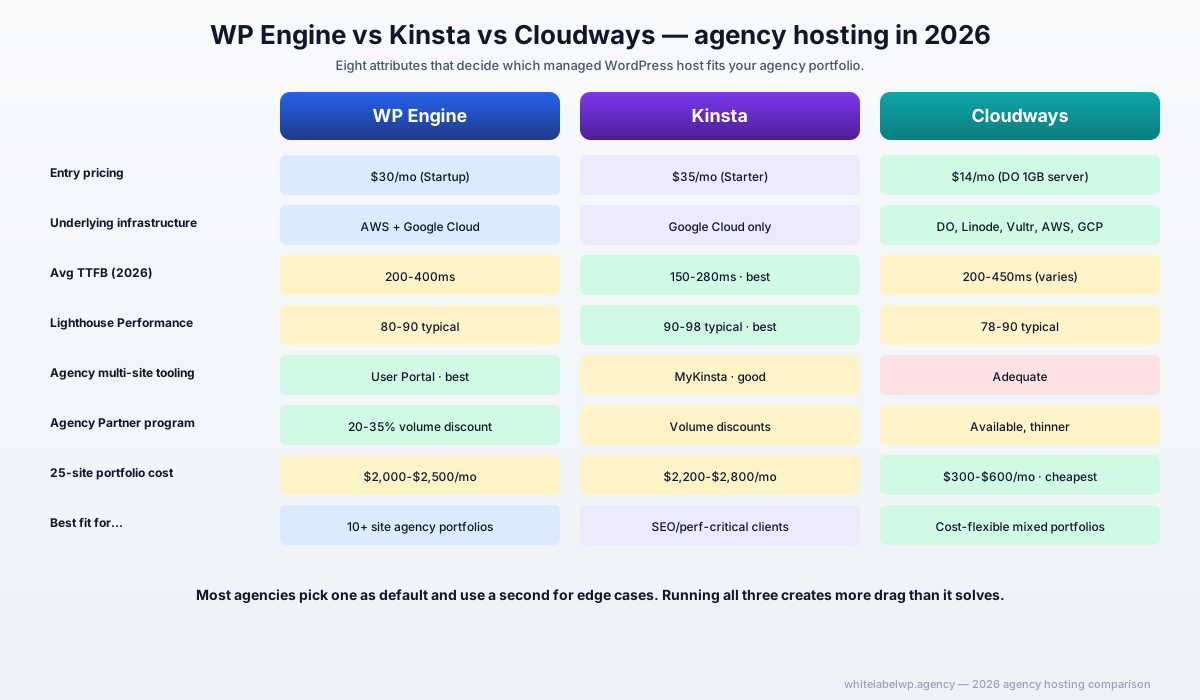
For agency portfolios in 2026, WP Engine wins on agency-management tooling (multi-site admin, user-level access, automated SSL across the portfolio), Kinsta wins on raw performance (Google Cloud infrastructure delivers faster Time to First Byte on average), and Cloudways wins on cost-flexibility (server-based pricing scales differently than per-site pricing). Most agencies should pick one as their default and use a second for specific edge cases — running all three usually creates more operational drag than it solves.
If we’re being specific about scenarios: 25-site portfolios with mixed sizes do best with a primary (WP Engine or Kinsta) plus Cloudways for the long-tail of low-traffic sites. Sub-10-site portfolios usually don’t need the complexity.
TL;DR — at a glance
| Attribute | WP Engine | Kinsta | Cloudways |
|---|---|---|---|
| Best for | Agency portfolios with management tooling needs | SEO/performance-critical sites | Cost flexibility, infrastructure choice |
| Entry pricing | $30/mo (Startup, 1 site) | $35/mo (Starter, 1 site) | $14/mo (DigitalOcean 1GB server) |
| Agency unlimited tier | Agency Partner program (volume discount) | Agency Partner program | Server-based (host multiple sites) |
| Underlying infrastructure | AWS + Google Cloud (mixed) | Google Cloud only | DigitalOcean, Linode, Vultr, AWS, GCP |
| Average TTFB (2026 benchmark) | 200-400ms | 150-280ms | 200-450ms (varies by underlying provider) |
| Built-in CDN | Cloudflare integration | Cloudflare integration | Cloudways CDN (Cloudflare based) |
| Staging environment | One-click | One-click | One-click |
| Daily backups | Yes (60-90 days retention) | Yes (14-30 days) | Yes (configurable) |
| Best for SEO-driven sites | Good | Best | Good |
| Best for agency multi-site management | Best | Good | Adequate |
WP Engine — at a glance
WP Engine launched in 2010 and is one of the most established managed WordPress hosts. As of 2026 they host roughly 1.5 million WordPress sites globally. The platform runs on a hybrid AWS + Google Cloud infrastructure with WP Engine’s proprietary tooling on top.
For agencies, WP Engine’s biggest structural advantage is the Agency Partner program — volume discounts (typically 20-35% off list for 5+ sites), centralized billing across the portfolio, the User Portal for managing all client sites in one place, and white-label option where the client never sees WP Engine branding.
Where WP Engine shines
- Agency multi-site management. The User Portal handles 25-100+ sites in one place. Add team members with site-specific permissions. Automate SSL renewals across the portfolio.
- Agency Partner program. Volume pricing, dedicated account management, and white-label reseller option for agencies that want to bill clients directly for hosting.
- Stack stability. 15+ years of operational maturity. Tooling around WordPress (deploy workflows, code management, content portability) is the most mature in the category.
- Studio plan for enterprise. For high-traffic client sites needing dedicated resources, the Studio tier provides isolated infrastructure.
- WooCommerce-optimized tier. Dedicated commerce tier with caching tuned for WooCommerce stores.
Where WP Engine might not fit
- Per-site pricing at scale. 50+ sites on Growth-tier pricing runs $5,000-$8,000/month even with volume discounts. Cloudways’ server-based model is meaningfully cheaper at that scale for sites with mixed traffic profiles.
- Performance ceiling. WP Engine sites benchmark fine but not class-leading. Kinsta typically wins on raw speed by 100-200ms TTFB on equivalent setups.
- Plugin restrictions. WP Engine maintains a “disallowed plugins” list (caching plugins, some backup plugins, certain SEO tools) that conflict with their internal stack. Most agencies adapt; some find it constraining.
Kinsta — at a glance
Kinsta launched in 2013 and runs entirely on Google Cloud Platform. As of 2026 they host fewer sites than WP Engine but are growing fast, particularly with SEO-driven and content-heavy clients where speed compounds into ranking advantage.
The structural advantage is performance. Google Cloud’s network, Kinsta’s stack tuning (Nginx + PHP-FPM optimized, Edge Caching, premium DNS), and the fully-managed CDN typically deliver 100-300ms lower TTFB than WP Engine and 5-10 Lighthouse Performance points higher on equivalent sites.
Where Kinsta shines
- Raw site speed. Most agency sites we benchmark on Kinsta come in at 90-98 Lighthouse Performance vs 75-90 on WP Engine. For SEO-critical clients, this gap is worth real money in ranking outcomes.
- MyKinsta dashboard. Clean, modern admin tooling. Easy to give clients limited access to their own site without exposing the full agency portfolio.
- Application Performance Monitoring. Built-in APM helps diagnose slow queries and plugin bottlenecks without external tools.
- Premium DNS included. Cloudflare Enterprise routing on every plan.
- Pay-as-you-go for visits beyond plan. Doesn’t force a tier upgrade when a site has a viral month.
Where Kinsta might not fit
- Agency tooling less mature than WP Engine. No equivalent of WP Engine’s Agency Partner program at the same depth. Volume discounts exist but the agency-management workflow has fewer dedicated features.
- Google Cloud-only. No infrastructure choice. For agencies whose clients require specific cloud regions or AWS-specific compliance certifications, this is a hard constraint.
- No WooCommerce-specific tier. Standard tiers handle WooCommerce well, but there’s no “commerce-optimized” plan with pre-tuned caching like WP Engine offers.
Cloudways — at a glance
Cloudways launched in 2009 and was acquired by DigitalOcean in 2022. As of 2026, Cloudways is positioned as the managed WordPress host with the most infrastructure flexibility — sites can run on DigitalOcean, Linode, Vultr, AWS, or Google Cloud underneath, with Cloudways’ management layer on top.
The structural advantage is pricing and infrastructure choice. Server-based pricing (starting at $14/month for a DigitalOcean 1GB server) means an agency can host 5-15 small client sites on one server instead of paying per-site. For long-tail client portfolios with many low-traffic sites, the savings compound.
Where Cloudways shines
- Server-based pricing. Host multiple smaller sites on one server. A $30/month DigitalOcean Premium server can handle 8-15 low-traffic agency sites comfortably.
- Infrastructure choice. Pick the underlying cloud provider based on geography, compliance, or cost preference.
- Direct server access. SSH, server-level monitoring, more granular control than fully-managed hosts.
- Cheaper at scale for mixed portfolios. Agencies with 30+ client sites where most are low-traffic see meaningful savings.
- Native integrations. Direct integration with major caching, CDN, and monitoring tools without plugin overhead.
Where Cloudways might not fit
- Less hand-holding. Cloudways is “managed” but the model assumes more technical comfort than WP Engine or Kinsta. Some operational tasks (server scaling, performance tuning) sit closer to the agency than to the host.
- Support response slower on lower tiers. Premium support is an add-on. Standard support response times are longer than WP Engine or Kinsta defaults.
- No agency partner program at the same depth. Volume pricing and white-label options exist but the agency-specific tooling is thinner.
- Multi-tenant performance tradeoffs. When 10 sites share a server, one site’s traffic spike can impact the others. Single-tenant infrastructure (WP Engine, Kinsta) doesn’t have this risk.
Performance — what the benchmarks actually say
Across the agency client sites we benchmark monthly on equivalent setups (same theme, same content, same plugins, same image weight):
| Metric | WP Engine | Kinsta | Cloudways (DO 2GB) |
|---|---|---|---|
| Time to First Byte (avg) | 250-350ms | 150-250ms | 220-400ms |
| Largest Contentful Paint | 1.6-2.4s | 1.2-1.8s | 1.7-2.6s |
| Lighthouse Performance (mobile) | 80-90 | 90-98 | 78-90 |
| Total Blocking Time | 100-250ms | 50-150ms | 120-280ms |
Kinsta consistently wins on raw speed metrics. The gap is largest on TTFB (where Google Cloud’s network advantage compounds) and on mobile Lighthouse scores.
The honest caveat: properly tuned sites on any of the three can hit 90+ Lighthouse scores. The hosting choice creates the ceiling, not the floor. Hosting matters less than image optimization, plugin discipline, and good page-builder choices for most sites.
Pricing breakdown across portfolio sizes
For an agency with mixed-size client sites (a few high-traffic, many lower-traffic):
| Portfolio size | WP Engine (with Agency discount) | Kinsta (Agency tier) | Cloudways (servers) |
|---|---|---|---|
| 5 sites | $200-$300/month | $200-$350/month | $80-$120/month |
| 25 sites | $1,400-$2,000/month | $1,500-$2,200/month | $300-$600/month |
| 50 sites | $3,500-$5,000/month | $3,800-$5,500/month | $700-$1,500/month |
| 100 sites | $7,000-$10,000/month | $7,500-$11,000/month | $1,500-$3,500/month |
Cloudways wins on raw pricing at scale, but the comparison isn’t apples-to-apples. The single-tenant performance and dedicated management on WP Engine/Kinsta justify the premium for agencies where uptime and speed are commercial deliverables. The wrong move is picking on cost alone — pick on fit, factor cost as a tiebreaker.
How to choose for your agency
Choose WP Engine as your default if:
- You manage 10+ client sites and need centralized portfolio management.
- You want the Agency Partner program’s volume discounts and white-label resale option.
- Your client mix includes WooCommerce stores benefiting from the dedicated commerce tier.
- Plugin restrictions don’t conflict with your standard stack.
Choose Kinsta as your default if:
- Your clients are heavily SEO-driven and Core Web Vitals matter to outcomes.
- You’re willing to trade some agency-management tooling depth for performance.
- You don’t need infrastructure choice beyond Google Cloud.
- MyKinsta’s modern admin matters to your team’s daily experience.
Choose Cloudways as your default if:
- Your portfolio is heavy on low-traffic client sites where per-site pricing is overkill.
- You want infrastructure choice (DigitalOcean, AWS, GCP, etc.).
- Your team has the technical comfort to handle server-level work.
- Cost optimization is a primary commercial lever.
Hybrid stacks that work
Two hybrid patterns we see work well:
- WP Engine primary + Cloudways for long-tail. Use WP Engine for the 15-20 most important client sites where management tooling and stability matter. Run the remaining low-traffic sites on Cloudways servers to compress cost. Roughly 30-40% portfolio cost savings vs all-WP-Engine.
- Kinsta primary + WP Engine for commerce. Use Kinsta for content sites where performance compounds into rankings. Use WP Engine’s commerce tier for WooCommerce clients where commerce-tuned caching matters. Two tools, two management dashboards, but each plays to strength.
Avoid running all three in production. The operational cost of maintaining three sets of credentials, three sets of deploy workflows, and three sets of support contacts usually outweighs the per-site optimization.
Where White Label WP Agency fits
We configure and manage WordPress sites on whichever host the agency or end client has chosen. Our care plans include hosting optimization, plugin update discipline, and performance monitoring regardless of which of the three hosts the site lives on.
For agencies migrating between hosts (e.g., WP Engine to Kinsta for performance reasons, or to Cloudways for cost), our migration service handles the move including DNS cutover and post-migration optimization.
Book a partner call if you’re evaluating hosting standardization across your client portfolio and want a second opinion on the right fit.
Frequently asked questions
Which managed WordPress host is best for agencies in 2026?
For agencies managing 10+ client sites, WP Engine’s portfolio-management tooling wins on operational efficiency. For agencies prioritizing raw site speed and Core Web Vitals, Kinsta’s Google Cloud infrastructure typically delivers better Lighthouse scores. For agencies wanting cost flexibility across mixed-size client portfolios, Cloudways’ server-based model saves 30-50% versus per-site pricing.
How much does WP Engine cost for agencies in 2026?
WP Engine Startup starts at $30/month per site; Professional at $59/month; Growth at $115/month. The Agency Partner program offers volume discounts at 5+ sites (typically 20-35% off list). For 25 sites on Growth-tier hosting, an agency typically pays $2,000-$2,500/month after volume discounts.
Is Kinsta faster than WP Engine?
On average, yes — Kinsta typically benchmarks 100-300ms faster on Time to First Byte and 5-10 Lighthouse points higher on Performance for equivalent sites. The difference comes from Google Cloud’s network and Kinsta’s stack optimization. For most agency sites the gap doesn’t visibly affect users; for SEO-critical sites where Core Web Vitals matter to ranking, the Kinsta advantage compounds.
When does Cloudways make more sense than WP Engine or Kinsta?
Three scenarios. First, agencies hosting many smaller client sites where per-site managed hosting is overkill — Cloudways’ server-based pricing lets you host 5-15 small sites on one $30/month server. Second, agencies wanting infrastructure choice — Cloudways supports DigitalOcean, Linode, Vultr, AWS, and Google Cloud as underlying providers. Third, agencies with technical staff who want more direct server-level access without going full self-managed.
Can I move my client sites between WP Engine, Kinsta, and Cloudways?
Yes, all three offer free migration tools and most agencies migrate without significant downtime. A typical 20-page site migrates in 2-4 hours of dev work plus DNS propagation. The harder question is whether to migrate — switching hosts mid-engagement adds operational cost (re-training the team, re-documenting credentials, re-checking SLAs) that rarely justifies the difference in hosting price alone.
What about lower-tier hosts like SiteGround or DreamHost for agency client sites?
For agency client sites, the lower-tier hosts trade reliability and support quality for cost. Agencies that try to run 20+ client sites on SiteGround GoGeek or DreamHost Shared usually experience 2-4x higher support ticket volume, more frequent uptime incidents, and slower response on emergency issues. The $5-$10/month per site savings disappears once internal time on hosting issues is factored in.